
ReviseReply AIRefine research. Advance science.

How ReviseReply AI works

From reviewer feedback to a clearer revision.

Follow a focused workflow to organise reviewer comments, prepare responses, manage revision tasks and export your documents.

Start your revision
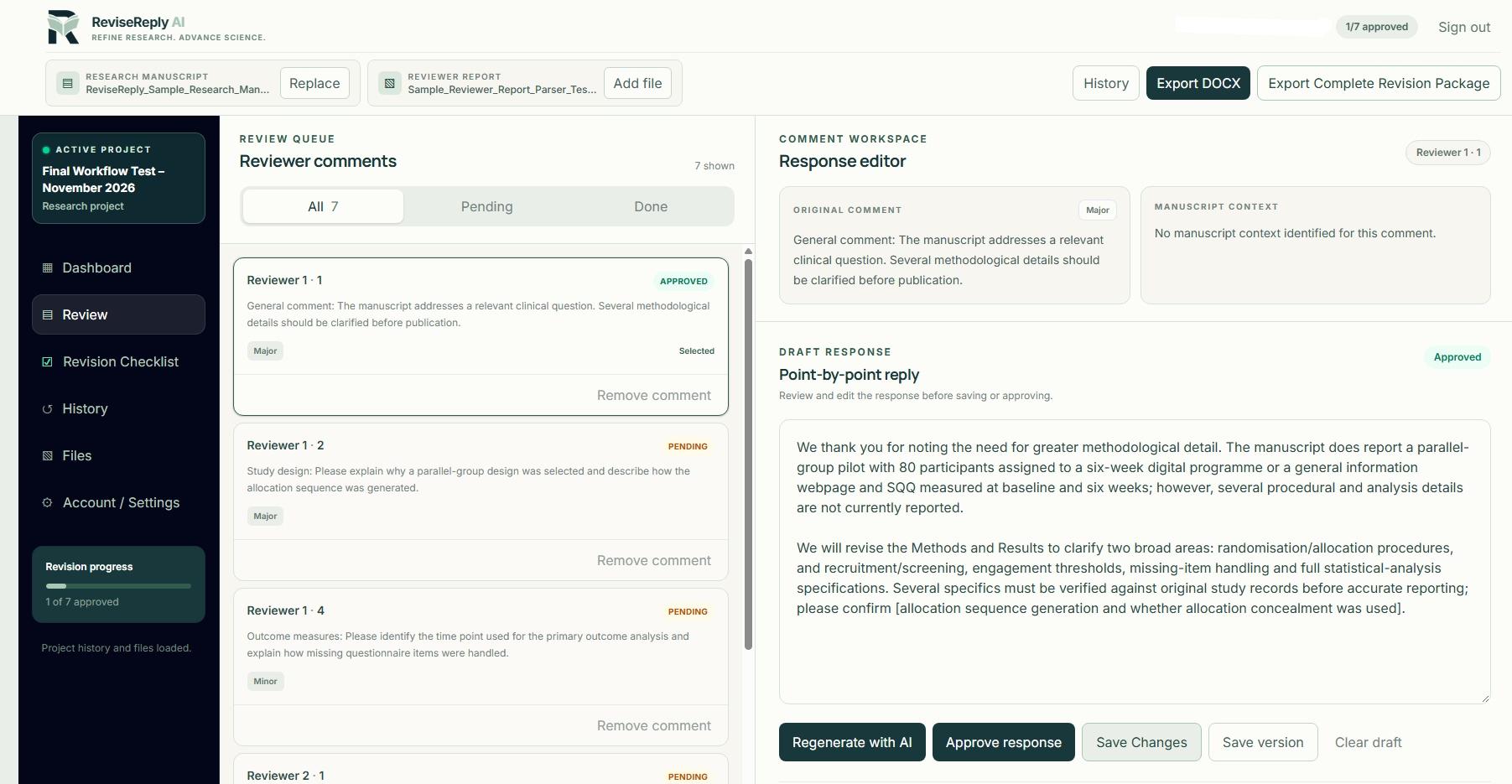
Actual ReviseReply AI workspace showing the reviewer queue, response editor, revision checklist navigation and export controls

The ReviseReply AI workspace

A practical four-step workflow

A clear process for your manuscript revision.

01STEP 01

SET UP YOUR PROJECT

Bring your manuscript and reviewer report together.

Start a research project and add the manuscript and reviewer report files you want to work with. Keep the source documents connected to the revision workspace.

  • ✓Create a dedicated research project
  • ✓Upload your manuscript
  • ✓Add your reviewer report

YOUR RESEARCH PROJECT

▤

Research manuscript

Add your manuscript file

Add file
▧

Reviewer report

Add reviewer feedback

Add file

Keep the source documents together in your project workspace.

02STEP 02

ORGANISE THE REVIEW

Work through reviewer comments in a clear queue.

Review the comments presented in your project workspace. See comment details, priority and response status, and select the point you want to address.

  • ✓Review extracted comments
  • ✓See pending and approved statuses
  • ✓Select individual comments to respond to

REVIEW QUEUE

Comment status
All commentsPendingDone

Reviewer 1 · Comment 1

APPROVED

General comment: The manuscript addresses a relevant clinical question. Several methodological details should be clarified before publication.

Major

Reviewer 1 · Comment 2

PENDING

Please explain why a parallel-group design was selected and describe how the allocation sequence was generated.

03STEP 03

DRAFT AND REFINE

Prepare a response, then make it your own.

Use AI assistance to draft a point-by-point reply. Read the original comment, review the draft, edit the wording and approve it when it is ready.

  • ✓Generate an AI-assisted response draft
  • ✓Edit and save your changes
  • ✓Approve each response when satisfied

COMMENT WORKSPACE

APPROVED

ORIGINAL COMMENT

Please clarify the methodology used for participant selection and provide additional detail on the inclusion criteria.

POINT-BY-POINT REPLY

We thank you for noting the need for greater methodological detail. We will revise the Methods and Results to clarify the relevant procedures and reporting.

Approve responseSave changes
04STEP 04

TRACK AND EXPORT

Keep revision tasks moving and prepare your documents.

Use the revision checklist and project history to stay organised. When your responses are ready, export your Word documents for a final review.

  • ✓Track revision checklist progress
  • ✓Revisit saved response history
  • ✓Export Response to Reviewers and the Complete Revision Package

PROJECT OUTPUTS

▤

Response to Reviewers

Word document

▧

Complete Revision Package

Word document

Revision progress

Track completed and outstanding tasks

✓

Ready to begin?

Bring a little more structure to your next revision.

Start a project and work through reviewer feedback in one focused workspace.

Get started